
General
Back to Blog
General12 min read
Document Storage vs Document Management: Why SOPs Need More Than a Shared Folder
A reliable procedure needs a clear path from storage to approval and everyday use.
Your team can find the procedure in seconds. That does not mean it should follow it.
The file might be an unapproved draft. The equipment settings might have changed. A supervisor might have added a better method to a local copy without updating the shared version. Search has solved the location problem, while the operating problem remains.
That is the practical difference between document storage and document management. Storage keeps information accessible. Management establishes who owns it, which version applies, how changes become effective, and what happens when people use it.
For operations, quality, and safety teams, that distinction matters wherever a document directs work. A standard operating procedure (SOP) should give employees confidence about what to do now and leave a dependable record of how that instruction was controlled.
This guide explains the difference, shows what control looks like in practice, and gives you a workable starting point for moving beyond a shared folder.
Key takeaways
Document storage organizes files; document management governs their lifecycle and use.
Version history helps, but it does not replace recorded approval, effective dates, and controlled access to current instructions.
SOPs and completed records need different treatment: instructions change, while records must preserve what happened.
Start with one important process, a named owner, and a tested approval-to-use workflow.
Connect procedure changes to training, checklists, findings, and corrective actions so improvements reach the people doing the work.
What is the difference between document storage and document management?
Document storage is the practice of saving, organizing, protecting, and retrieving files. Document management adds the responsibilities and controls that keep those files useful throughout their working life.
A document collection is simply the material gathered together: procedures, forms, manuals, screenshots, and supporting records. Storage provides the infrastructure for keeping that collection accessible. Management supplies the rules for creating, reviewing, approving, distributing, updating, and retiring the information.
The same platform may support all three. A shared drive can form part of a controlled system when people configure and maintain the right workflows. Conversely, buying specialist software will not resolve unclear ownership or an approval process nobody follows.
The difference becomes especially important across the different types of SOPs. Safety, quality, maintenance, HR, and operational procedures serve different purposes, but each needs controls proportionate to the work and its risks.
Control area | Storage alone | Managed documents |
Main purpose | Find and share files | Keep instructions reliable for use |
Responsibility | May depend on folder access | Named owner and reviewers |
Approval | May sit in a separate message | Recorded against the exact revision |
Current version | May depend on filenames | Clear status and effective revision |
Changes | Files can be replaced | Changes reviewed and released |
Historical evidence | Old files may remain | Prior versions and decisions retrievable |
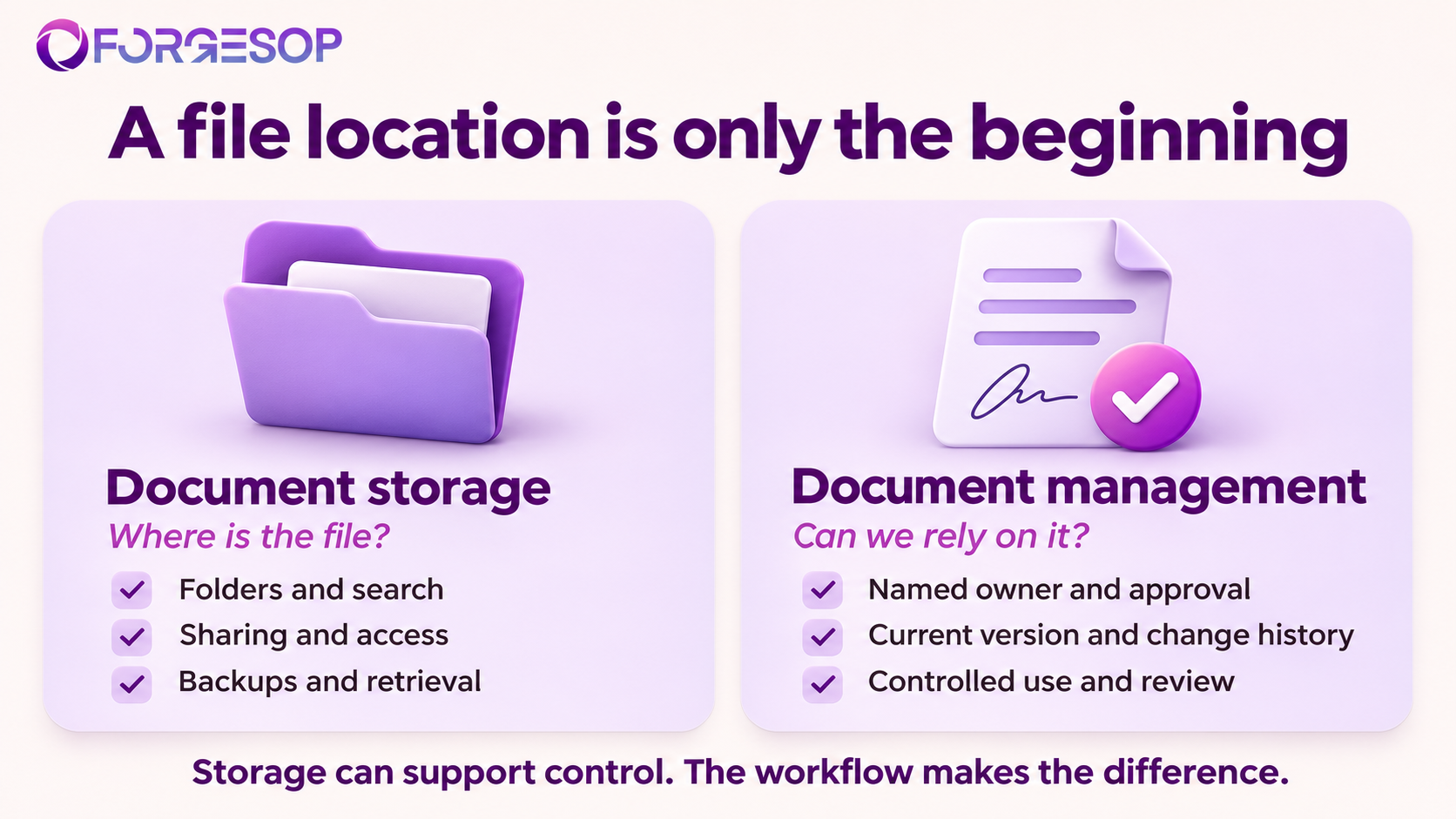
Storage makes documents available. Management establishes whether they are suitable to rely on.
Five signs your document library needs stronger control
A tidy folder structure can hide weak processes. Look for these signals in everyday work:
People ask a colleague which file is current even after finding the document.
Approval evidence lives in an email thread that is separate from the approved content.
New starters learn from personal notes because official instructions do not match the task.
Audits require someone to reconstruct which procedure applied on a particular date.
A recurring problem gets fixed locally without a corresponding update to the SOP.
These signals point to different gaps. Unclear approval calls for better release controls. Conflicting local practices call for process review. Missing historical evidence calls for better recordkeeping. Treating all three as a search problem usually produces a better-organized library with the same uncertainty inside it.
This is also why document management belongs within broader process orientation. A useful procedure reflects an agreed workflow, including handoffs, decisions, and responsibilities. It cannot compensate for a process that nobody has agreed to own.
What does a controlled SOP lifecycle look like?
An SOP needs a route from a proposed instruction to an approved method, then back through review when the work changes. The following controls make that route visible.
1. Draft: give the procedure an owner
Assign one accountable owner who understands the process and can coordinate updates. Record the document identifier, purpose, scope, intended users, relevant site or equipment, and the evidence the task should produce.
Bring experienced employees into drafting. Ask them to demonstrate the work, identify exceptions, and explain where judgment is required. This turns knowledge into usable instructions before it disappears into another person's private notes.
AI can help structure an initial draft, but someone with process knowledge must check its sequence, assumptions, and technical accuracy. A plausible instruction is still only a proposal until the responsible people validate it.
2. Approve: connect sign-off to the exact revision
Review should answer practical questions: Can the intended user follow the steps? Are responsibilities clear? Do the criteria explain when to stop, escalate, or accept the result?
Record who approved the procedure, what revision they approved, and when. Define the authority required for the process, including independent review where appropriate. An approval saying “looks good” is weak evidence if the underlying file can change without a new decision.
Keep version history and approval history distinct. Version history explains how content changed. Approval history explains which content was authorized for use. Both are useful, and neither fully substitutes for the other.
3. Publish: make the effective instruction easy to recognize
Use a clear status model, such as draft, under review, approved, effective, and retired. Approval and effectiveness may happen on different dates if employees need preparation or training before a change takes effect.
Publish the approved revision through a dependable access point. Keep drafts away from routine users and prevent superseded versions from appearing as current instructions. Retain the historical versions people may need for investigations or evidence.
Plan for printouts and downloaded copies. Decide who receives them, how replacements are issued, and how users check their validity. A controlled digital library cannot prevent confusion if an old binder remains the easiest reference on the floor.
4. Use: connect instructions to the work
Give employees access where the task happens, using terminology they recognize. Link the SOP to the checklist, form, or record used to capture the result. The goal is to make the approved method convenient enough to become the normal method.
Distinguish acknowledgment from competence. Recording that someone opened or accepted a document does not prove they can perform a task. Higher-risk work may require instruction, a demonstration, supervised practice, or another defined competence check.
For employee processes, connect document changes to the responsibilities described in your HR and training SOPs. Specify who identifies affected roles, arranges training, and keeps the resulting evidence.
5. Review: respond to change and retire obsolete instructions
Set a review schedule based on the procedure's risk, complexity, and rate of change. Also define triggers: new equipment, revised requirements, audit findings, employee feedback, or a problem during execution.
A review should compare the written method with actual work. If the content remains suitable, record that decision. If it needs revision, explain what changed and why, then route the new version through the required approval and release steps.
Use findings to improve the procedure rather than repeatedly reminding people to “be careful.” Where investigation identifies a procedural cause, connect the update to corrective and preventive action management, with an owner and a check that the fix worked.
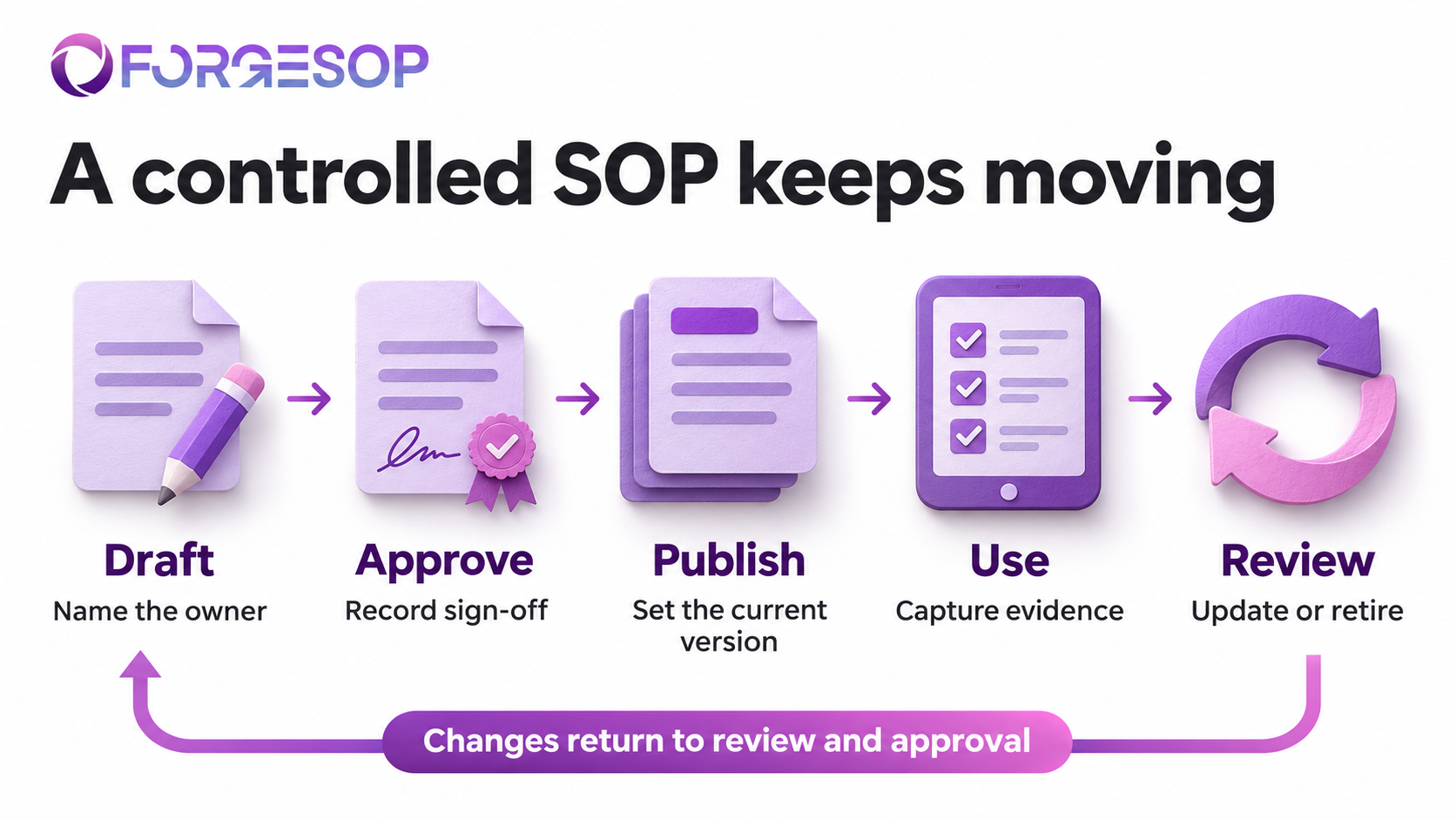
A controlled SOP moves through drafting, approval, publication, use, and review, with changes returning through the control process.
SOPs and records need different controls
An SOP describes how work should be performed. A completed checklist, inspection result, or training assessment records what happened. Managing both as interchangeable editable files creates avoidable problems.
Suppose an inspection form changes to add a new check. Future inspections should use the appropriate revised form. Historical inspections should still show the questions, answers, signatures, and context that applied when those inspections occurred.
Do not overwrite past records to make them resemble the latest template. If a correction is needed, preserve the original entry and record the correction according to your process. Define who can make corrections and how the reason and timing are captured.
Likewise, set retention and disposal rules by record category and applicable obligations. “Keep everything forever” and “delete old files each year” are both poor substitutes for a considered policy. Make sure the information can be retrieved and read throughout the period you need it.
A practical example: changing an incoming inspection SOP
Consider an illustrative warehouse where the incoming inspection procedure changes after a recurring supplier issue. The revised method adds a specific packaging check and requires damaged deliveries to be held for a quality decision.
In a storage-only workflow, someone uploads a new file and sends a message. The morning shift uses the new instructions, the evening shift follows a printed copy, and a temporary worker receives an older form. Each person can reasonably believe they followed the procedure.
In a managed workflow, the process owner revises the SOP and explains the change. The designated reviewer approves the new revision. The team sets an effective date, updates the related checklist, replaces controlled printouts, and briefs the affected roles before release.
When an inspection is completed, its record identifies the procedure or template version used. If the same supplier issue returns, the reviewer can examine the relevant method, the observed result, and the corrective action together.
The benefit is a shorter path from a decision to consistent execution. A manager can answer which version applied and how the change reached users without piecing the story together from filenames and memory.
How to move from shared folders to controlled documents
Start with a manageable pilot. Moving every file at once makes it harder to discover whether the new controls actually work.
Step 1: choose one process with a visible control gap
Pick a process where unclear instructions cause rework, delays, or inconsistent decisions. Incoming inspection is one option; ForgeSOP's guide to quality SOPs explains other procedures centered on inspection and acceptance criteria.
Identify the current files, working copies, forms, and completed records. Ask the people doing the task which materials they actually use.
Step 2: agree on the minimum control rules
Name the owner and approver. Define statuses, effective-date rules, review triggers, and access permissions. Decide what evidence you will retain and where employees will go for the current instruction.
Make these rules simple enough to explain during a shift handover. A workflow that requires constant interpretation will invite workarounds.
Step 3: clean the content before migrating it
Remove duplicates from the active library, identify the authoritative starting revision, and correct obvious gaps with the process owner. Archive superseded material with enough context to understand its history.
Do not mark an unknown file “approved” just because migration requires a status. Resolve the uncertainty through review.
Step 4: test one real release from end to end
Take a small, genuine change through drafting, review, approval, distribution, and use. Have an employee access the procedure through the route available during ordinary work.
Then retrieve the previous revision and its approval evidence. Test both present-day usability and historical traceability before expanding the system.
Step 5: measure whether the controls help
Track a few useful measures: documents without owners, overdue reviews, time needed to retrieve approval evidence, and reports of obsolete instructions in use. Review employee feedback alongside those numbers.
If people still ask which version applies, investigate the access route and release process. Adding another reminder will not fix conflicting sources.
What to look for in document management software
Evaluate a platform through a demonstration of your own workflow. Ask the vendor to revise an SOP, approve it, publish it, capture a task result, and retrieve the evidence later.
Check how it handles concurrent drafts, changes after sign-off, effective dates, site-specific access, obsolete copies, and historical records. Ask what you can export if you move to another system. Confirm the difference between features available now and capabilities described as future plans.
For teams connecting instructions to inspections, audit and inspection software should support more than a place to upload completed PDFs. Look for a clear relationship between the checklist used, the finding recorded, the person assigned to act, and the evidence of resolution.
Quality management guidance also treats documentation as something to develop and maintain for the organization's needs. ISO 10013:2021 provides guidance on documented information for management systems. The practical lesson is to choose controls that serve your processes and obligations, then verify that they operate as intended.
How ForgeSOP connects document control to daily operations
ForgeSOP's SOP and quality management capabilities bring procedure authoring, e-signed approvals, version history, and controlled distribution into a connected workflow. Its published feature descriptions also connect SOP revisions with deviations and CAPAs, helping teams carry improvements back into the procedure.
ForgeSOP also describes a hash-chained audit trail that records actions, actors, timestamps, and content references in a tamper-evident history. That evidence supports traceability; the process owner still needs to ensure the instruction itself is suitable and that users can follow it.
If your team can find its files but still cannot confidently identify the approved method, start with one important SOP. Explore ForgeSOP's SOP management software and use that procedure to test the full journey from draft to controlled use.
Frequently asked questions
What is the main difference between document storage and document management?
Document storage focuses on saving, organizing, and retrieving files. Document management governs how information is created, reviewed, approved, used, updated, and retired. Storage is a necessary foundation, while management adds the decisions and responsibilities that make a document dependable for its intended purpose.
Can a shared drive be used for document management?
Yes, if it is supported by effective controls for ownership, approval, access, versioning, review, and retention. The important test is whether those controls work consistently. As teams and sites grow, maintaining them manually can become difficult, which is one reason organizations consider dedicated software.
Is version history enough to control an SOP?
No. Version history shows changes, but a controlled SOP also needs a defined owner, an approval decision tied to the revision, a clear effective status, and a reliable way to reach users. Historical versions should remain retrievable without being mistaken for current instructions.
How often should SOPs be reviewed?
Set the frequency according to risk, process complexity, change rate, and applicable requirements. Also review after relevant incidents, findings, equipment changes, or other triggers. A routine review date is useful, but it should not delay an update when the approved method no longer matches the work.
What is the difference between document management and document control?
The terms overlap. Document management commonly describes the broader lifecycle, including organization, access, collaboration, and retention. Document control emphasizes the rules governing identification, approval, changes, distribution, and status. Define the terms in your own system so responsibilities and expectations remain clear.
What should an SOP change history include?
Include the revision identifier, change date, author or responsible role, a meaningful summary of the change, and the relevant approval or effective-date information. Link to the full prior version and supporting decision records where needed. A label such as “updated” rarely explains enough on its own.
General


Forge better processes
One platform. Always audit-ready.
Bring SOPs, checklists, audits, incidents, and CAPAs into one connected system for safer, clearer, and more consistent operations.
No credit card required · Built for teams that run on process